
Location, crop, and result live in separate records
- the team cannot see what is currently growing in each zone;
- areas and quantities have to be reconciled by hand;
- after harvest, the actual production history is difficult to reconstruct.
Farm production records
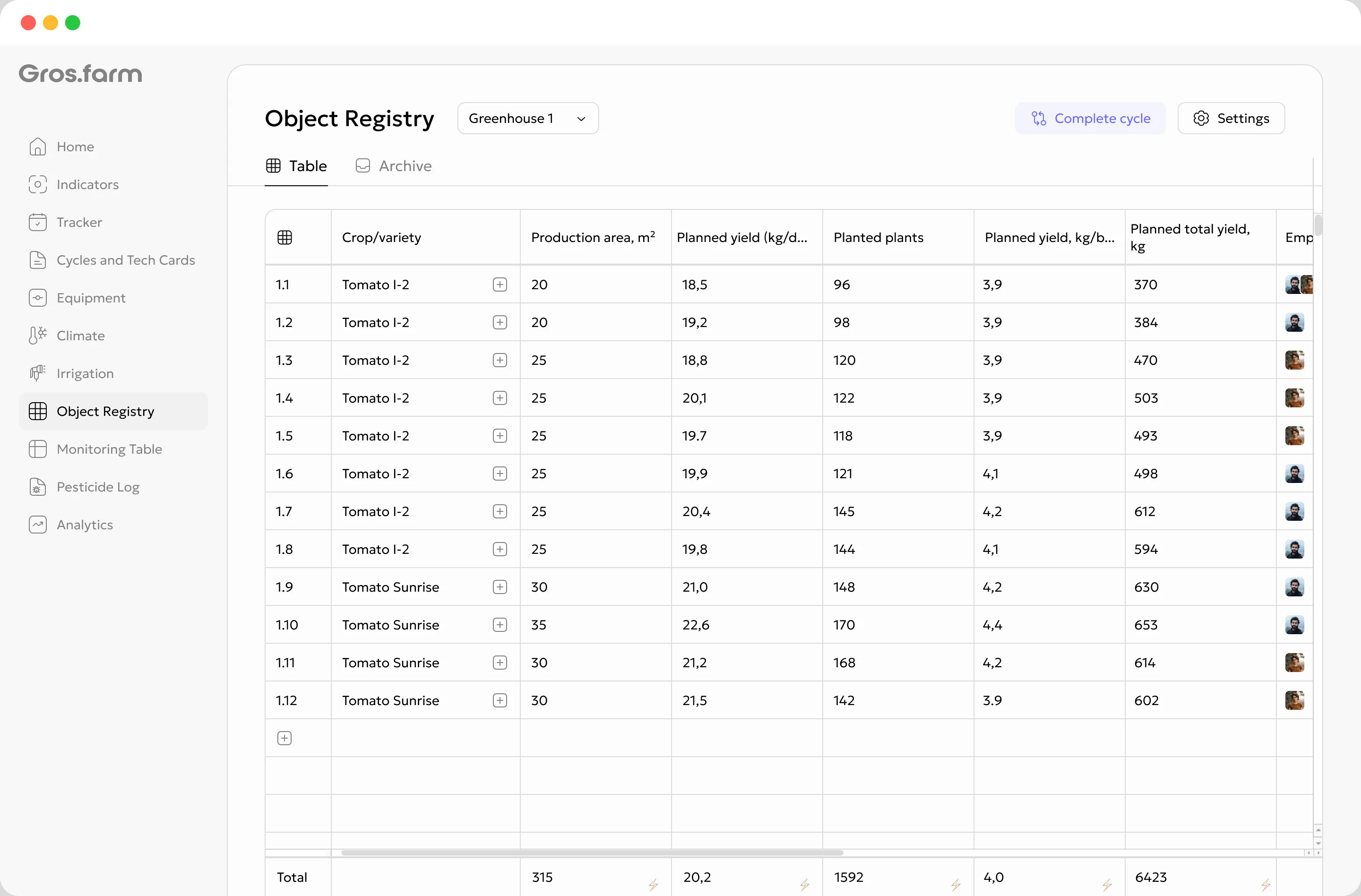
Map a greenhouse, field, orchard, grow room, or indoor farm into working zones. For every zone, keep the crop, occupied area, plan, actual result, and responsible person together in the context of the current growing cycle.
The foundation of production records
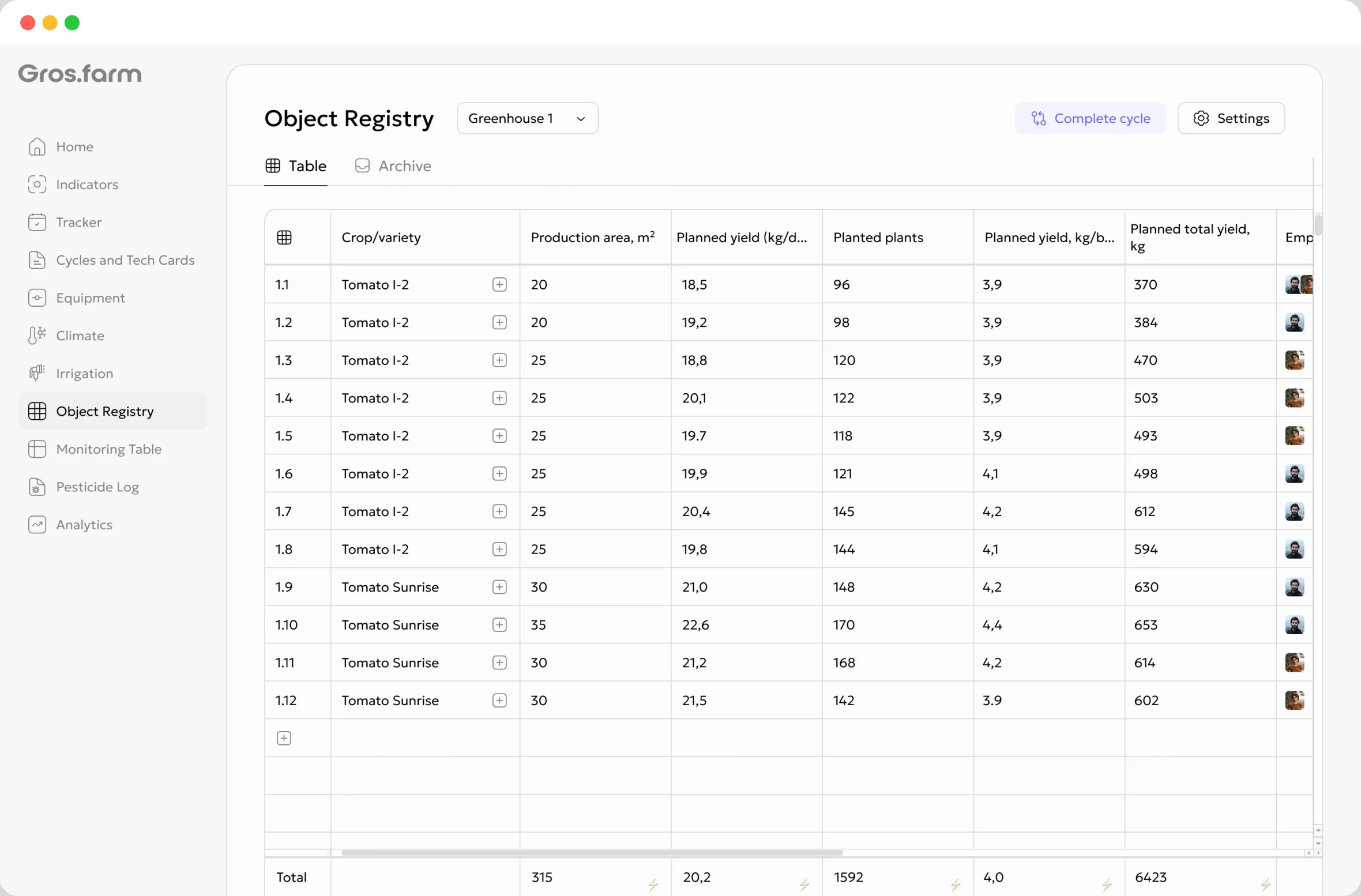
See which crop occupies each row, block, room, or plot, how much capacity it uses, who owns the work, and what result the current cycle is expected to deliver.
In practical terms: open a row and see what is growing there, how much space it occupies, the planned result, and the person responsible.
Production structure
Start with facilities such as greenhouses, fields, orchards, rooms, or indoor farms. Then divide each facility into the units your team already uses: rows, blocks, compartments, plots, racks, bays, or another familiar production zone.
Create only the zones for which the team will regularly maintain data.
A shared workspace for the operation and its team.
A physical production site with its own cycles and data.
A practical production unit represented by a registry row.
Plan and actual production data for this zone.
Configuration without development
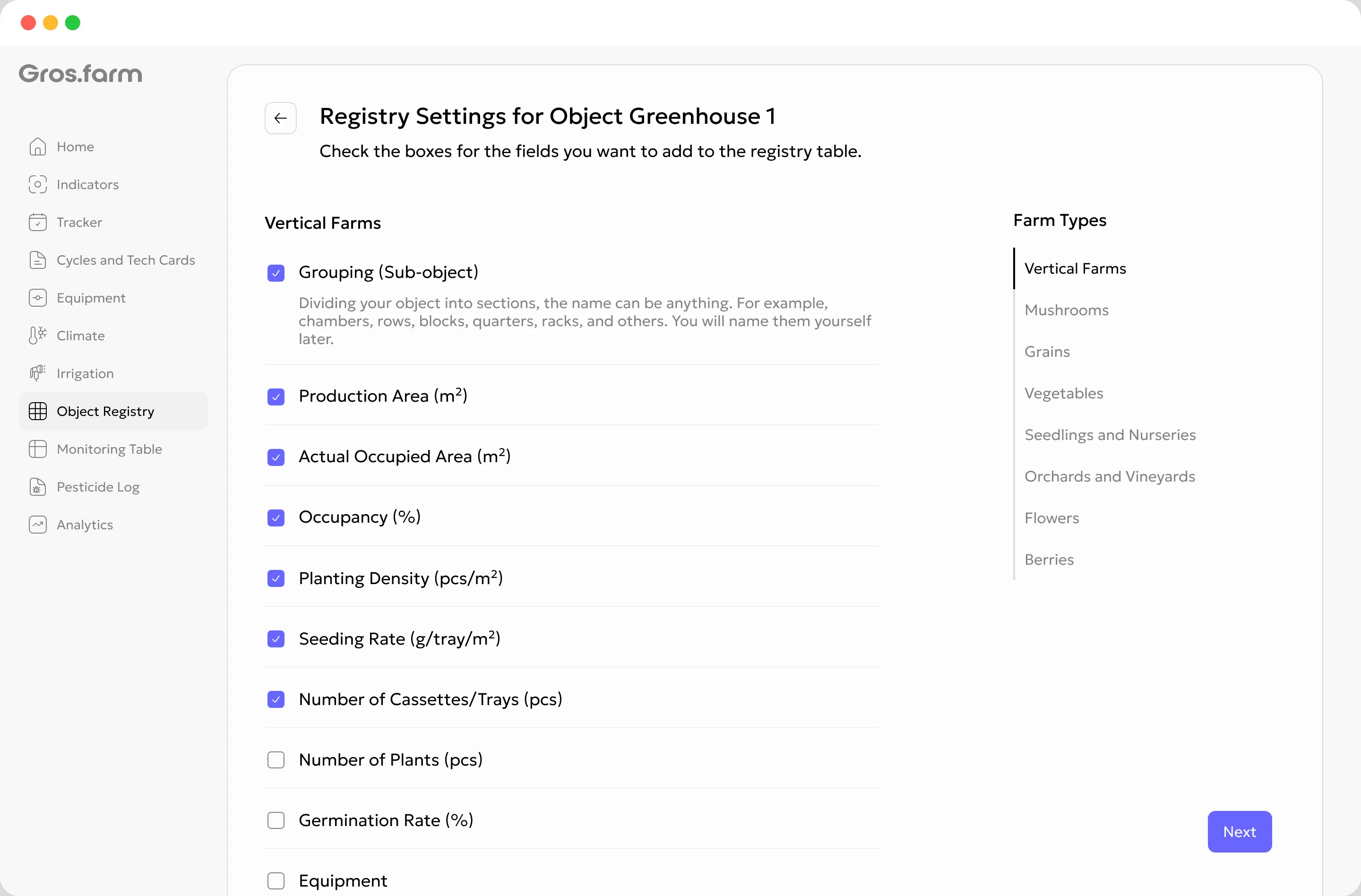
A greenhouse, orchard, mushroom room, nursery, and vertical farm need different records. Gros.farm provides a suitable starting set, and you keep only the columns your team will use.
Define what a zone is called and how many there are, such as 50 rows or 12 grow rooms.
Selecting a production type provides relevant fields for area, planting, quantity, and output.
Keep the parameters your team will actually maintain and add custom fields where needed.
Current-cycle data
Each row describes what is happening in a specific production zone now. The team enters actual data, Gros.farm calculates the values it can derive, and the registry rolls up totals for the facility.
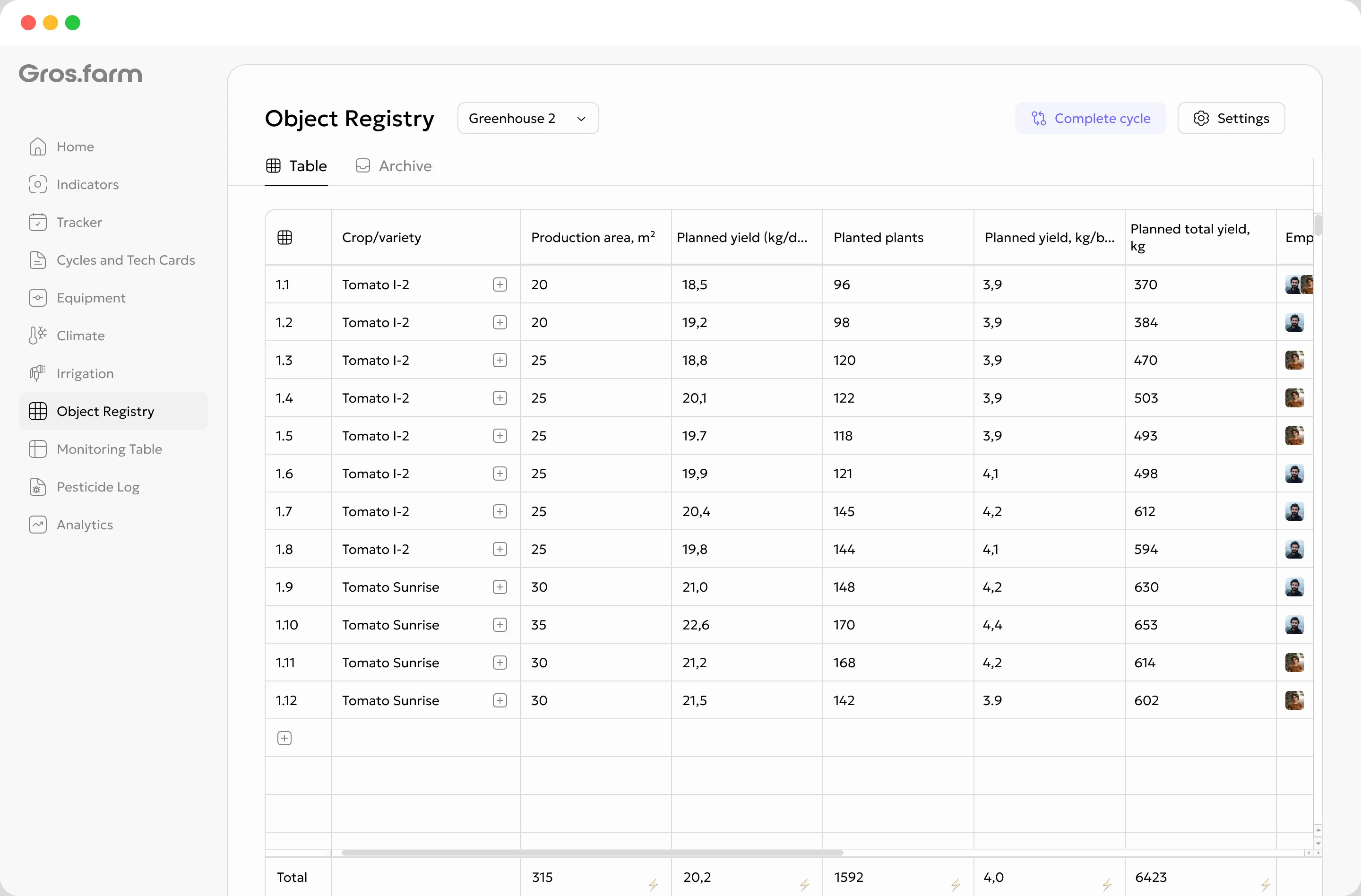
A row keeps the crop or variety, occupied area, quantity, timing, and current result.
When source data is available, Gros.farm derives occupancy, density, and other totals.
The summary row brings together area, quantity, and other values that can be aggregated.
Import an existing table to get started, then maintain the record directly in the registry.
Planned occupied area, quantity, timing, and output.
Actual occupancy, recorded quantity, timing, quality, and output.
Every activity has a location
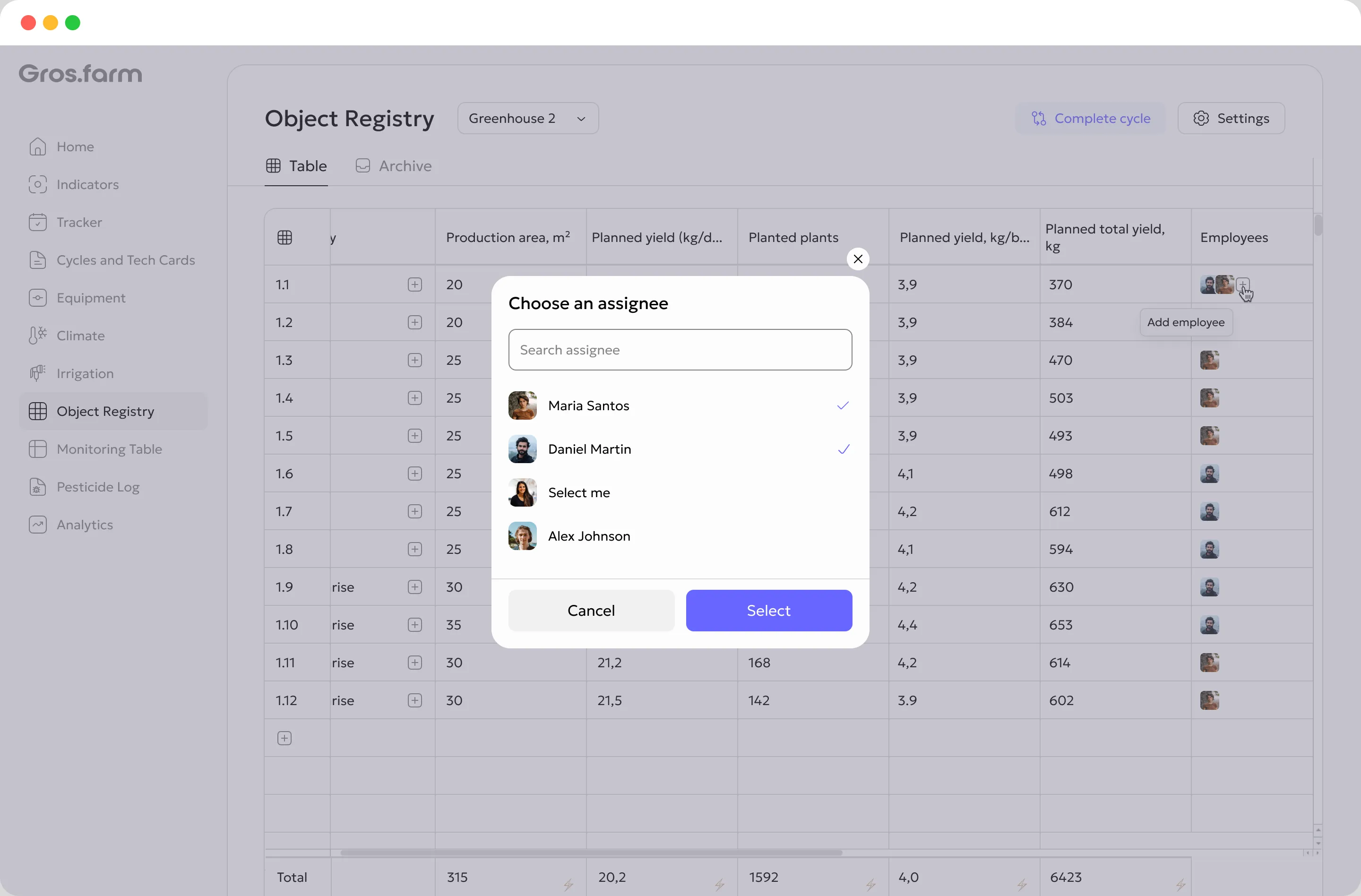
Tie a production zone to a responsible person, available sensors, and tasks. The team can then see who owns the area, where a reading came from, and exactly where work needs to happen.
Who owns the zone and keeps its record current.
Which production zone a sensor or measurement belongs to.
What needs to be done, where, by whom, and by when.
Growing history
Review actual values before closing the cycle. Once confirmed, populated rows move into read-only history and the active table is ready for the next cycle.
Update registry rows as production progresses.
Confirm areas, quantities, dates, and the production result.
Populated rows move into read-only cycle history.
The active table is ready for the next crop or batch.
An empty registry does not create a history record. Review the actual data before confirming completion.
Connected production context
A tech card describes how the cycle should run. Monitoring records what is happening. Tasks organize the team’s response. The registry connects all of it to a facility, production zone, crop, and active cycle.
Define the stages, targets, and work for a growing cycle.
Keeps crop observations and conditions in a daily and weekly context.
Connect work with its location, owner, status, and due date.
A model receives a value together with its facility, zone, crop, and cycle context.
AI can help examine a hypothesis, while the final decision remains with the responsible specialist.
One model, different production systems
A greenhouse may use compartments and rows, an orchard uses blocks and plots, and a mushroom operation uses grow rooms. Name production zones in familiar terms and collect only the data your team needs.
Compartments, bays, blocks, or rows.
Area · crop · plant quantity · planned yieldFields, plots, orchard blocks, or rows.
Area · variety · planting · expected and actual outputRooms, racks, levels, or production zones.
Batch · quantity · production area · cycle resultRows, benches, trays, blocks, or sections.
Crop · variety · density · quantity · marketable outputFarm registry questions
A spreadsheet row is usually an isolated record. In Gros.farm, a registry row belongs to a facility, production zone, crop, and active growing cycle. It can also carry plan and actual values, a responsible person, data sources, and related work. Completed-cycle data remains available as read-only history.
It is a part of a facility that makes sense to manage separately: a row, compartment, room, block, plot, rack, level, bay, or another working unit. Your operation chooses the name and number of zones.
The starting set depends on the production type. Typical fields include crop and variety, production and occupied area, plant or substrate quantity, density, dates, planned and actual yield or output, equipment, and responsible people. Keep only the fields relevant to your workflow and add custom fields when needed.
No. The registry can be configured and maintained manually. If sensors or integrations are available, connect their data to the relevant production zone and crop.
Populated rows move into read-only history and the active table becomes available for the next cycle. An empty registry does not create a history record. Cycle completion cannot be undone, so actual data should be reviewed first.
Use the level at which decisions are made and responsibility is assigned. Zones that are too large hide differences; zones that are too small create unnecessary maintenance. A useful rule is that each row should describe one clear production unit the team can keep current.
It can if that reflects your real record-keeping. However, plan-versus-actual review is clearer when each row has one production meaning, so different crops are usually easier to manage as separate zones or rows.
Start with your real production structure
We will help map facilities into practical production zones, choose the right fields, and connect the registry with active growing cycles.